Do you ever wonder how secure your online accounts are? Do you prefer using the same password for your email account and all other applications? Do you create simple, easy-to-remember passwords with your personal info in them? If the answer to the last two questions is yes, you might be putting yourself and your data at risk. Read this article to learn how to create a strong password that can protect your online security and privacy.
What is a strong password?
A password is a secret phrase that you use to access your accounts, such as email, social media, banking, shopping, and others. A strong password must be complex so that it will make it hard for hackers to guess or crack. A strong password should meet the following criteria:
Is it long enough?
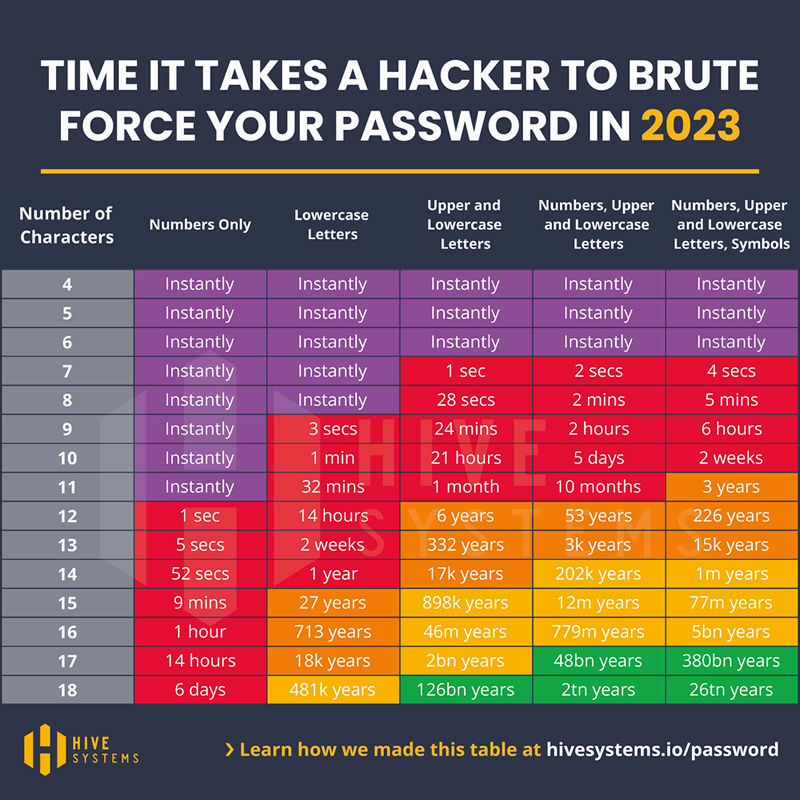
The longer the password, the harder it is to guess or brute-force. A good rule of thumb is to use at least 12 characters for your password. Have a look at Fig.1 to see how much time it takes to crack a password based on the length and complexity.
Is it complex enough?
The more varied the characters in your password, the harder it is to crack. To make your password more secure, make sure it consists of symbols, numbers, and letters in uppercase and lowercase.
Is it unique enough?
The more original the password, the harder it is to hack. Generally, a good password should not contain common words, phrases, names, dates, or personal information. You should also avoid using the same password for multiple accounts or services.
Fig.1 (Source: Hive Systems)
Is it memorable enough?
The easier the password is to remember, the less likely you are to forget it or write it down somewhere insecure. A good rule of thumb is to use a passphrase or a mnemonic device for your password.
For example, you can use the first letters of a sentence that you can easily recall, such as “My dad’s favorite football team is Real Madrid” -> “MdfftiRM”. You can also add some numbers for example Real Madrid’s foundation date 1902 and symbols to make it more complex, such as “MdfftiRM!1902”.
How to create a strong password?
There are different methods and tools that can help you create a strong password. Here are some of them:
Use a password manager
A password manager is a software that can create and store your passwords in an encrypted vault that only you can access with a single master password. Some password managers can also help you fill in your passwords automatically when you log in to your online accounts. Some examples of popular password managers are LastPass, Bitwarden, 1Password, and Dashlane.
Use a password generator
A password generator tool can create random and complex passwords for you based on your preferences. You can use a password generator to create new passwords. Some examples of online password generators are LastPass Password Generator, Strong Random Password Generator, Random Password Generator, and Online Password Generator.
To make it easy for you, we created a robust password generator that will allow you to create and change the passwords according to your preferences: Feel free to play with it.
Cyberapp Password Generator
Keep in mind that all the tools we introduced to you here are simply facilitators. You must add your own spice in it.
Use your creativity
You can also create your own strong passwords by using your imagination and following the criteria mentioned above. For example, you can use a memorable phrase, song lyric, a quote from a movie, or an acronym as a base for your password, and then add some numbers and symbols to make it more complex. For example, let’s say your favorite song is “Castle on the Hill” by Ed Sheeran, you can use the first letters of the song and the singer to create the first part of the password and add a symbol, and after that add the birthdate of the singer, finally “ContHES!!1991” as a possible password.
Remember, this is just an example. You can find your own way of creating passwords, too. Another example could be using hints of the platform that you are creating the password for. Let’s assume that you are signing up for Gmail. You can create a password like G-[your favorite character from Star Wars]![The name of your friend whom you saw the Star Wars for the first time]-[The year that you saw it]-[and/or your own spice], which will end up with a password like G-Ahsoka!Eddy-2010. Now lose or change some characters with symbols like G-Ahs@ka!Ed-2010.
When you want to create a Hotmail password, you can also use the same secret formula by changing the first letter so that you will end up something like H-Ahs@ka!Ed-2010. You can go as creative as you can, the only secret is that there in only one person in the whole wide world who knows the way you make it and it is only you. Not even your beloved dog can know about it.
Why does it matter?
Creating a strong password is not only a good practice for your online security but also a responsibility. A weak password can lead put the organization you work for at risk at a substantial level. On the other hand, using strong passwords can protect yourself and your organization from cyber attacks that can cause serious harm and damage. Here are some of the benefits of using strong passwords:
- You prevent identity theft.
- Identity theft is when someone uses your personal information, such as your name, email address, social security number, or credit card number, to commit fraud or other crimes in your name. By using strong passwords, you make it harder for hackers to access your online accounts and steal your identity.
- You protect your data and privacy.
Data and privacy are the most valuable assets in the digital world. By using strong passwords, you make it harder for hackers to access your data and privacy, such as your photos, videos, messages, contacts, documents, browsing history, location history, and more.
- You protect your reputation
Reputation is an important aspect of your personal and professional life. By using strong passwords, you make it harder for hackers to access your reputation and relationships, such as your social media profiles, emails, chats, comments, reviews, ratings, feedback, and more.
What are you waiting for?
Now that you know how to create a strong password and why it matters. Take action now and improve your online security and privacy with stronger passwords. You can start by checking your current passwords and changing them if they are weak, reused, or compromised.
You can also use CyberApp Password Generator to create strong passwords. And don’t forget to share this article with loved ones, so they can also benefit.