Our emails are one of the most important online accounts we have. It can store our personal and professional messages, contacts, photos, documents, and other data. It can also be used to access other online services, such as social media, banking, shopping, and more. That’s why it’s crucial to keep your email accounts secure and prevent hackers from accessing it.
How to know if your email account is compromised?
Some signs can indicate that your email account has been hacked or compromised by someone else. Here are some of them:
- You receive a notification from your email provider that your password has been changed or someone has logged in to your account from an unfamiliar device or location.
- You notice unusual activity in your email account, such as emails marked as read that you didn’t read, emails in your sent folder that you didn’t send, or contacts receiving spam or phishing messages from your account.
- You have difficulties logging in to your email account or other online accounts that are linked to your email address.
- You see unexpected charges on your credit card or bank statements that are related to online purchases or subscriptions that you didn’t make.
A data leak or breach can be the root cause
A data leak or breach is an event where private and sensitive data, such as email addresses, passwords, and other personal information, are exposed to unauthorized third parties. Hackers can use this data to access your email account or other online accounts that are linked to your email address.
To check if your email address has been involved in a data leak or breach, you can use cyberapp.io online tool that can search across multiple data breaches to see if your email address has been compromised. That is the first and the most important step to take counter actions: Diagnose the problem.
What to do if your email account is compromised?
If you suspect that your email account has been compromised, you should act quickly to regain control of it and protect your data and identity. Here are some steps you can take:
Change your password
If you can still access your email account, you should change your password immediately. Your new password should be strong, complex, and unique. It should contain at least 12 characters, including symbols, numbers, and letters in uppercase and lowercase. You should also avoid using common words, phrases, names, dates, or personal information in your password. For example, instead of using “password123” as your password, you can use something like “P@ssw0rd!321”.
More about strong passwords :
How To Create s Strong Password
Change your security questions
If your email provider offers security questions as a way to verify your identity or reset your password, you should change them as well. Hackers may have found the answers to your existing security questions by scanning your email messages or social media profiles. You should choose security questions that are not easy to guess or find out by others. For example, instead of using “What is your mother’s maiden name?” as a security question, you can use something like “What is the name of the first book you read?”.
Scan your devices for malware
Malware is malicious software that can infect your devices and steal your data or damage your system. Hackers may have used malware to gain access to your email account or other online accounts. You should scan your devices for malware using reliable antivirus software and remove any suspicious programs or files. You should also update your operating system and applications regularly to fix any security vulnerabilities.
Warn your contacts
If hackers have used your email account to send spam or phishing messages to your contacts, it would be a nice practice to warn them not to open or click on any links or attachments in those messages. You should also apologize for any inconvenience or harm caused by those messages and explain that your email account has been compromised.
Report identity theft
If hackers have used your email account to access other online accounts or services that involve financial transactions or personal information, such as banking, shopping, or government websites, you may be a victim of identity theft. Identity theft is a serious crime that can damage your credit score and reputation. You should report identity theft to the relevant authorities and institutions as soon as possible and follow their instructions on how to recover from it.
How can you prevent your email account from being compromised?
The best way to prevent hackers from compromising your email account is to use good security practices and habits while using the internet. Here are some tips on how to keep your email account safe:
Use a strong password and change it regularly
As mentioned above, a strong password is one of the best defenses against hackers. You should use a different password for each online account you have and change it every few months. You can use a password manager tool to create and store your passwords securely and conveniently.
Use two-factor authentication (2FA). 2FA is an extra layer of security that requires you to enter a code or a token in addition to your password when logging in to your online accounts. The code or token can be sent to your phone via text message, call, or app, or generated by a physical device that only you have access to. 2FA can prevent hackers from accessing your accounts even if they have stolen or guessed your password.
Cyberapp Password Generator
Be careful with phishing emails
Phishing emails are fake messages that pretend to be from legitimate sources, such as banks, companies, or government agencies. They try to trick you into clicking on malicious links or attachments that can infect your devices with malware or lead you to fake websites that can steal your login credentials or personal information. You should be careful with any email that asks you to verify your account, update your information, confirm a payment, or claim a reward. You should also check the sender’s address, the message’s tone and grammar, and the link’s URL before clicking on anything. If you are not sure about an email, you can contact the sender directly using another channel, such as phone or chat, to verify its authenticity.
Use a secure connection
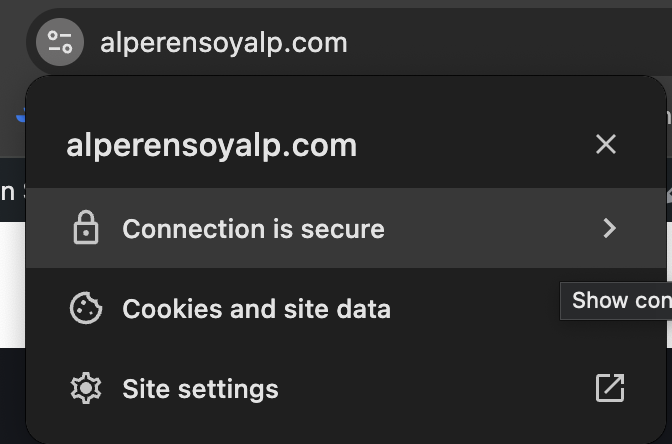
Do not use public Wi-Fi available in cafes, airports, and hotels as much as possible. But if you’ve to use one; you should use a virtual private network (VPN) to encrypt your internet traffic and prevent hackers from intercepting or tampering with it. You should also use HTTPS websites, as they provide a secure connection between your browser and the website’s server. You can tell if a website is using HTTPS by looking for a padlock icon or a green bar in the address bar of your browser. See below figures:


Your email account is more than just a way to communicate with others. It is also a gateway to your online identity and data. By following the steps and tips in this article, you can protect your email account from hackers and enjoy a safer and more secure online experience.